
What Is the Best AI Image Generator for Creating Stunning Art?
The best AI image generator is a tool that turns a written description into a finished picture using a trained neural network no drawing skills required. You type a prompt like “a neon-lit cyberpunk city at night, cinematic lighting,” and within seconds you get one or more images matching that description. In 2026, the field is crowded with strong options, and the “best” one depends heavily on what you’re trying to make and how much you’re willing to pay.
This guide breaks down how these tools work, what to look for, the top use cases, honest benefits and limitations, and a straightforward Q&A so you can pick the right one for your project, whether you’re after the best free AI image generator or a premium paid model for professional work.
The market has changed a lot in a short time. Just a couple of years ago, the conversation was mostly Midjourney versus a handful of Stable Diffusion forks. Today there are dozens of viable options spanning chat-based tools, dedicated art platforms, open-source models you can run yourself, and enterprise APIs built for scale. That range is great for choice, but it also means “best” is no longer a single answer it’s a question of fit.
The Main Parts That Make Up an AI Image Generator
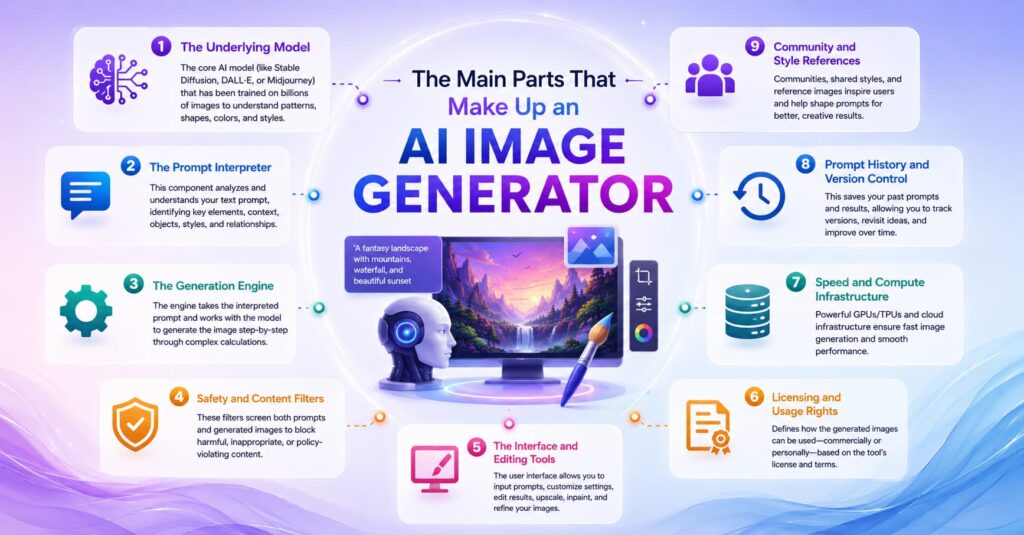
Every AI image generator, no matter which company built it, is made of the same core pieces working together. Understanding these parts helps you evaluate any tool, not just the popular names.
1. The Underlying Model
This is the “brain” usually a diffusion model or a newer transformer-based model trained on massive datasets of images and captions. The model architecture determines quality ceiling, speed, and what the tool is naturally good at (photorealism, illustration, typography, etc.).
2. The Prompt Interpreter (Text Encoder)
This piece converts your written prompt into a mathematical representation the model can actually use. Better text encoders understand nuance, style references, and complex multi-object scenes instead of just picking up on keywords.
3. The Generation Engine
This is the actual image-making process repeatedly refining noise into a picture (diffusion) or building the image piece by piece (token-based generation, like the GPT-Image family uses). Speed and resolution depend heavily on this layer.
4. Safety and Content Filters
Nearly every mainstream tool has filters blocking things like graphic violence, real-person deepfakes, or explicit content. These vary in strictness between platforms.
5. The Interface and Editing Tools
This includes the website or app you actually use, plus extras like inpainting (editing part of an image), upscaling, background removal, and text editing inside images.
6. Licensing and Usage Rights
Determines whether you can use outputs commercially, whether the training data was licensed, and who technically “owns” the image.
7. Speed and Compute Infrastructure
Behind the scenes, every generation request runs on a GPU compute. This determines how fast you get an image back, anywhere from about 1 second for lightweight, speed-optimized models to 8+ seconds for the highest-fidelity ones, and it’s part of why premium tools cost more per image.
8. Prompt History and Version Control
More mature platforms let you revisit past prompts, keep variations of an image side by side, and track which settings produced which result. This matters more than people expect once you’re generating dozens of images for a single project.
9. Community and Style References
Many tools let you reference other users’ styles, use community-shared prompt presets, or browse a public feed for inspiration. This can shortcut a lot of trial-and-error, especially for beginners still learning how to phrase prompts effectively.
Checklist – evaluating any AI image generator:
- Does the model handle the style you need (photorealistic, illustration, anime, product mockups)?
- Does it render text accurately, if you need text in images?
- Is there a usable free tier or free trial?
- Are commercial usage rights clearly stated?
- Does it support editing (inpainting, background removal, upscaling)?
- How fast is generation, and does that matter for your workflow?
- Is there an API if you need to automate image creation?
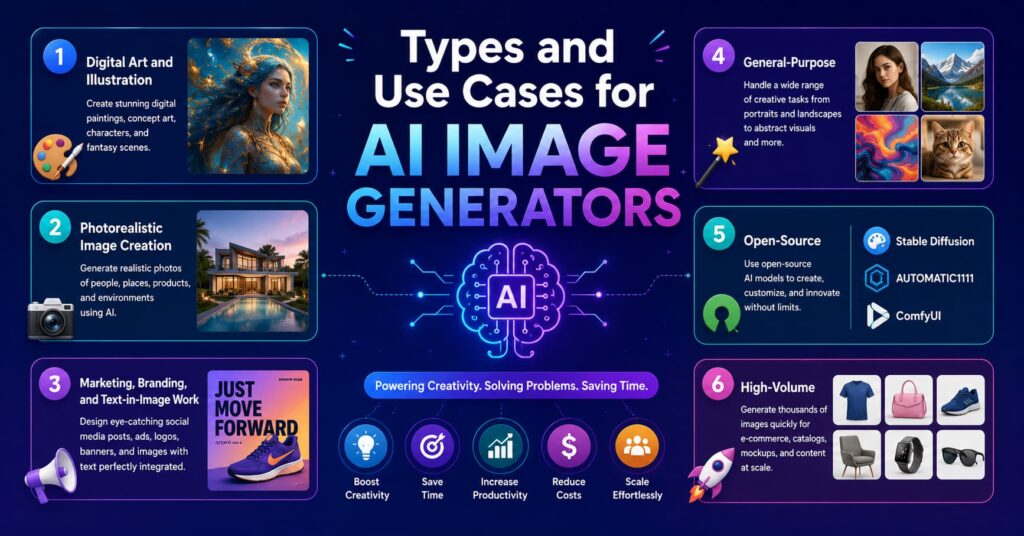
6 Types and Use Cases for AI Image Generators
Follow Us Instagram
Not everyone needs the same tool. Here’s how the main use cases break down.
1. Digital Art and Illustration
Artists and hobbyists use AI Image Generator tools like Midjourney to produce stylized, painterly, or highly imaginative art. This is where aesthetic quality matters more than literal prompt accuracy, many artists still consider Midjourney the reference point for artistic style, with Midjourney raising the bar for artistic image generation once again and solidifying its position as a top choice for art lovers and creative projects where aesthetics are paramount</cite>.
2. Photorealistic Image Creation
When you need something that looks like an actual photograph product shots, portraits, marketing visuals models like Imagen 4 Ultra and FLUX variants tend to lead. <cite index=”5-1″>Imagen 4 Ultra produces the most photorealistic output of any publicly available AI image generator API in 2026, rendering skin textures, fabric details, water reflections, and atmospheric lighting with a fidelity other models haven’t matched, though it costs more (around $0.08 per image) and takes about 8 seconds per image</cite>.
3. Marketing, Branding, and Text-in-Image Work
If you need readable text inside your images product labels, posters, social graphics this is a distinct use case with its own leaders. <cite index=”5-1″>Ideogram v3 is considered the clear leader for images that need readable text, such as product labels, signage, brand names, and posters, rendering text with accuracy other models still struggle to consistently achieve</cite>.
4. General-Purpose / Conversational Generation (Best AI Photo Generator for Everyday Use)
Tools built into chat apps ChatGPT’s image feature and Google’s Gemini/”Nano Banana” models let you AI image generate just by describing what you want in normal conversation, then refine with follow-up messages. <cite index=”3-1″>Google Gemini, in testing, gave the most consistent and realistic results while also being free, standing out for how accurately it follows prompt details</cite>. This category is often the easiest entry point and doubles as a strong best ai photo generator option for people who want realistic, camera-like results without learning prompt syntax.
5. Open-Source / Locally Run Generation
For developers, privacy-conscious users, or anyone who wants full control (and no per-image cost), open-weight models can run on personal hardware. <cite index=”4-1″>Open-weight AI image generators like Flux Schnell and Stable Diffusion can be run locally for free, while several hosted providers also offer a small free tier</cite>.
6. High-Volume / Budget Production
E-commerce sellers and content teams generating hundreds of images need speed and low cost over top-tier polish. Lightweight models built for volume, like Seedream variants, are designed to keep <cite index=”8-1″>Seedream 4.5 useful for budget-conscious e-commerce and fashion work</cite>, and similar fast models like <cite index=”5-1″>Z-Image Turbo generate images in about 1 second, prioritizing speed over maximum fidelity</cite>.
How It Actually Works, Step by Step
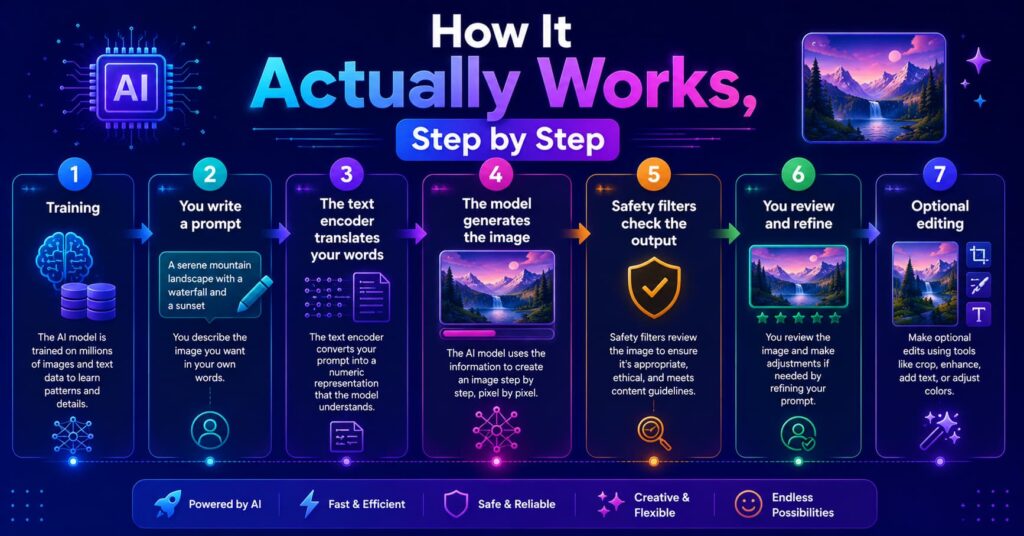
Here’s the plain-English version of what happens between typing a prompt and getting an image.
Step 1 – Training (already done before you ever use the tool). Before you ever use an AI Image Generator, billions of image-text pairs are used to train a neural network, essentially a complex algorithm loosely modeled on the human brain, so it learns what dogs, the color red, specific art styles, and countless other concepts actually look like.
Step 2 – You write a prompt. With an AI Image Generator, you describe the image you want, subject, style, mood, lighting, color palette, and composition. The more specific your prompt, the closer the output matches your vision.
Step 3 – The text encoder translates your words. Your prompt gets converted into a numerical representation the model can act on. This is why oddly specific wording sometimes works better than vague adjectives.
Step 4 – The model generates the image. Most tools use diffusion: <cite index=”4-1″>starting from random noise and refining it step-by-step into a coherent image, guided by the text encoder’s interpretation of your prompt</cite>. Newer models work differently – <cite index=”4-1″>transformer-based generators like the GPT-Image family produce images token by token, similar to how language models generate text</cite>.
Step 5 – Safety filters check the output. Before the image reaches you, most AI Image Generator platforms screen the output against content policies to catch anything that violates their guidelines. This ensures the final result stays safe and appropriate for use.
Step 6 – You review and refine. Most people don’t get a perfect image on the first try. When using an AI Image Generator, testers consistently point out that the biggest mistake is quitting after just a strong image usually takes two to three rounds of prompting, reviewing, and refining before it’s truly polished. Treat your first output as a draft, not a final result, and keep adjusting your prompt based on what the AI Image Generator gives you back.
Step 7 – Optional editing. Many AI Image Generator tools also offer built-in editing upscaling, background removal, inpainting for specific regions, or direct text adjustments. This lets you polish your final image without needing a separate editing tool.
Key Factors to Weigh Before Choosing One
Beyond picking a use case, a few practical factors tend to decide which tool actually sticks for people long-term.
Budget and pricing model. Some tools charge per image, others charge a flat monthly subscription regardless of volume, and open-weight models are free but require your own hardware or cloud hosting. Match the pricing model to how many images you’ll realistically generate per month a heavy user on a per-image plan can end up paying more than a light user on an “unlimited” subscription, and vice versa.
Learning curve. Chat-based tools (ChatGPT, Gemini) have essentially no learning curve since you just describe what you want conversationally. Dedicated art platforms like Midjourney have more specialized syntax (aspect ratios, style weights, version flags) that takes longer to master but rewards you with more precise control once learned.
Where you’ll actually use the output. If images are headed straight into a Photoshop or Illustrator workflow, a tool like Adobe Firefly that’s built into that ecosystem will save real time. If you’re posting straight to social media, a simpler chat-based tool is often enough.
Team vs. solo use. Teams generating high volumes of marketing assets with an AI Image Generator benefit from API access and batch generation. Solo creators and hobbyists are usually better served by a simple web interface and a modest free or low-cost plan.
How important legal safety is to you. If outputs will be used commercially in ads, packaging, or a paid product prioritize tools that are explicit about licensed training data and commercial usage rights, rather than assuming any output is automatically safe to monetize.
Benefits and Limitations – An Honest Look
Every AI image generator comes with real upsides and real trade-offs. Here’s a fuller breakdown of both sides so you know exactly what you’re signing up for before you commit time or money.
Benefits
- Speed. What used to take hours of manual design work now takes seconds to generate a first draft.
- Low cost of entry. <cite index=”4-1″>Pricing ranges from under $0.01 per image for open-weight or lightweight generators to $0.10 or more for frontier models</cite> and several tools offer meaningful free tiers.
- No artistic skill required. Anyone who can describe a scene can AI image generator one, which opens up visual creation to people who never learned to draw or use design software.
- Rapid iteration. You can test dozens of visual directions, different moods, color palettes, compositions, before committing to one, something a human illustrator would take days to produce.
- Built-in editing. Many platforms bundle upscaling, background removal, and text editing so you don’t need separate software or a design-suite subscription.
- Resolution has improved dramatically. High-resolution output that used to require manual upscaling is increasingly native, some premium tools generate at 4096×4096 by default, and even mid-tier models handle 2K without extra steps.
- Lowers the cost of visual content for small businesses. A solo entrepreneur or small marketing team can produce product mockups, social graphics, and ad creative without hiring a designer or photographer for every asset.
- Useful for rapid concept exploration. Game designers, architects, and product teams increasingly use these tools to visualize ideas early, before committing budget to full production.
- Multilingual and more accessible. Many tools now accept prompts in multiple languages and can render non-English text inside images, once a major weak spot.
- Consistency features are improving. Newer models can hold a character’s appearance or a brand’s visual style across multiple generations, which used to be nearly impossible.
Limitations
- Inconsistent results on the first try. Multiple rounds of refinement are usually necessary, which eats into the “instant” appeal, expect to prompt, review, and re-prompt rather than get a perfect image immediately.
- Text and hands remain tricky for some models. Even in 2026, text rendering is a genuine differentiator between tools rather than a solved problem, which is exactly why models like Ideogram carved out a specialty niche.
- Sameness across outputs. One tester noted a real drawback: <cite index=”1-1″>practically every ChatGPT-generated image people share online tends to use the same recognizable illustration style, so what feels unique often isn’t</cite>.
- Cost adds up at scale. With an AI image generator, a model like Imagen 4 Ultra costs about $0.08 per image, fine for a handful of hero shots, expensive if you need thousands.
- Copyright and training-data questions remain unresolved. Ongoing debate exists around artistic merit, whether these tools replace or assist artists, and how training data was sourced, questions without a fully settled answer yet.
- Subscription costs for premium tools. For example, one popular art-focused platform prices its plans <cite index=”9-1″>from around $10/month for roughly 200 generations up to $120/month for about 4,000 generations</cite>, a real budget consideration for hobbyists.
- Prompt skill still matters. Great results aren’t purely automatic, vague prompts produce generic images, so there’s a genuine learning curve to writing prompts that reliably get the result you picture in your head.
- Free tiers come with real constraints. Daily credit caps, watermarks, slower queue times during peak hours, and lower resolution are common trade-offs on no-cost plans.
- Content filters can be unpredictable. Safety filters sometimes block legitimate, harmless prompts due to overly cautious keyword matching, which can be frustrating for professional workflows.
- Ownership isn’t always clear-cut. The legal status of AI image generator is still evolving in many countries, so commercial use isn’t always risk-free.
- Hardware requirements for local/open-weight models. Running models like Stable Diffusion or Flux locally for free still requires a reasonably powerful GPU, which isn’t accessible to everyone.
How It’s Different From Similar Topics People Mix It Up With
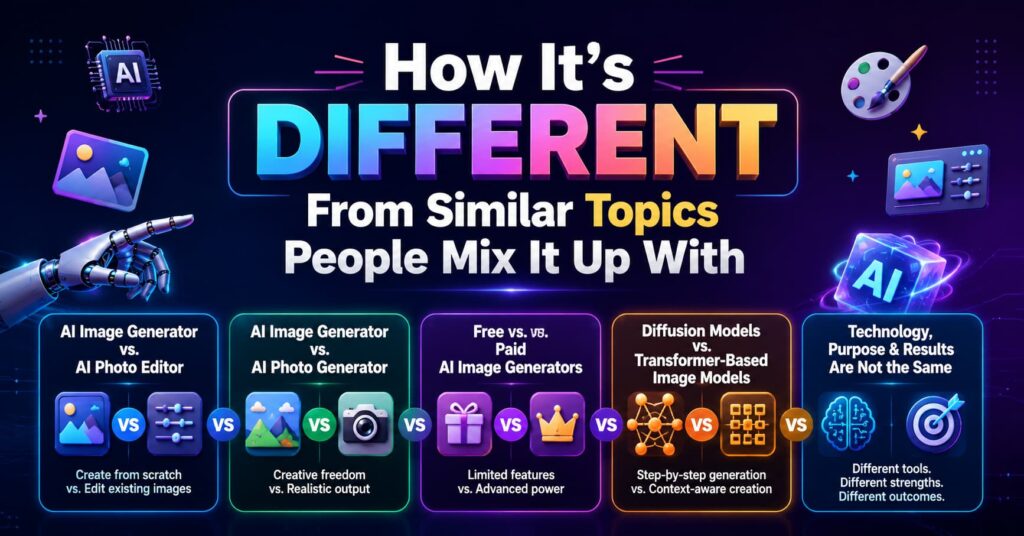
AI image generator vs. AI photo editor. An ai image generator creates a picture from scratch (or from a rough sketch) based on a text prompt. A photo editor (even an AI-powered one like Photoshop’s Generative Fill) modifies an existing photo, removing objects, replacing skies, extending backgrounds. Some tools, like Adobe Firefly, blur this line by doing both.
AI image generator vs. AI photo generator. These terms are often used interchangeably, but “AI photo generator” usually implies a focus on photorealistic output specifically, portraits, product photography, realistic scenes, rather than stylized art, illustration, or anime. If your search is specifically for a best ai photo generator, you likely want a model tuned for realism rather than artistic flair.
Free vs. paid AI image generators. A best free ai image generator typically means either a tool with a generous free tier (limited daily credits) or an open-weight model you can run yourself at no cost. A best ai image generator free search usually reflects the same intent people wanting quality results without a subscription. The tradeoff is usually resolution caps, watermarking, slower queues, or fewer generations per day compared to paid plans.
Diffusion models vs. transformer-based image models. Diffusion models (Stable Diffusion, FLUX, Midjourney) build images by denoising step by step. Transformer-based models (the GPT-Image family) AI image generator more like how language models generate text, token by token. Neither is universally “better” they simply have different strengths in prompt adherence and text rendering.
AI art vs. AI-assisted art. Fully AI image generator art comes entirely from a prompt. AI-assisted art usually means a human artist uses AI tools for parts of the process (backgrounds, texture generation, color exploration) while retaining creative control over the final piece.
Common Questions People Search For
1. What is the best AI image generator overall right now?
There’s no single universal answer, it depends on your priority. For photorealism, models like Imagen 4 Ultra tend to lead; for artistic style, Midjourney remains a favorite; for text rendering, Ideogram specializes; and for an easy, free, conversational option, Google’s Gemini-based image tools are a strong starting point.
2. What is the best free AI image generator?
Free options worth trying include Google Gemini’s image tools, ChatGPT’s free-tier ai image generation, and open-weight models like Stable Diffusion or Flux Schnell that you can run without a subscription. Generous daily free credits are also offered by some newer all-in-one platforms.
3. Is there a truly best AI image generator free version with no limits?
Not really free tiers almost always come with daily generation caps, lower resolution, slower processing during high demand, or watermarks. Open-weight models run locally can avoid ongoing costs entirely, but you’ll need decent hardware and some technical setup.
4. What’s the best AI photo generator for realistic portraits?
Models built specifically around photorealism, like Imagen and top-tier FLUX variants tend to perform best for portraits, skin texture, and lighting accuracy. Conversational tools like Gemini’s image models are also praised for realistic, natural-looking output.
5. Can I use AI-generated images commercially?
It depends entirely on the platform’s terms. Some tools built with licensed training data (Adobe Firefly, for example) are marketed specifically as commercially safe. Others have murkier terms, so always check the specific license before using an output in a paid product or ad campaign.
6. Why do my AI-generated images look wrong or generic?
Usually it’s the prompt. Vague words like “nice” or “beautiful” don’t give the model much to work with describing actual colors, mood, lighting, and composition produces far better results. It also typically takes a few rounds of refinement rather than a single attempt.
7. Do I need design skills to use an AI image generator?
No, that’s the core appeal. You need to describe what you want clearly, which is more about communication than artistic training, though understanding basic composition and lighting terms does help you get better results faster.
8. How much does an AI image generator typically cost?
Costs vary widely, from under a cent per image for lightweight or open-weight models to roughly $0.08–$0.10 per image for premium frontier models. Subscription-based art tools often run $10–$120 per month depending on how many images you generate.
9. What’s the difference between the best AI image generator free plan and a paid one?
Free plans typically cap how many images you can generate per day, may add watermarks, run at lower resolution, and place you in a slower queue during high-demand periods. Paid plans generally unlock higher resolution, faster generation, more daily credits, commercial usage rights, and priority processing.
10. Can AI image generators create consistent characters across multiple images?
Increasingly, yes. Newer models are specifically built to keep a character’s face, outfit, or overall style consistent across a series of images, which is useful for comics, storyboards, and branded content, though it still typically requires reference images or careful prompt repetition rather than being perfectly automatic.
Helpful Tools and Resources
- Google Gemini (image generation) – strong free option, praised for realistic, detail-accurate results.
- ChatGPT / GPT-Image – easy conversational interface, strong text rendering, no separate tool to learn if you already use ChatGPT.
- Midjourney – the go-to for artistic, stylized image generation.
- Adobe Firefly – best fit for commercial work needing licensed-safe training data and integration with Photoshop/Illustrator.
- Ideogram – best for images requiring accurate readable text (posters, labels, signage).
- Stable Diffusion / FLUX (open-weight) – best for local, free, fully customizable generation if you’re comfortable with some technical setup.
- Independent leaderboards (e.g., image arena-style ranking sites) – useful for comparing models by blind human vote quality rather than marketing claims.
How to Get Started – Simple Checklist
- Decide your main use case: art, realism, marketing/text, or general everyday use.
- Try at least one free tool first before paying for anything.
- Write a specific prompt (subject, style, lighting, color, mood) instead of vague adjectives.
- Generate multiple variations, don’t judge a tool from one result.
- Refine your prompt based on what the first draft got wrong.
- Check the platform’s commercial usage rights before using an image professionally.
- Explore built-in editing tools (upscaling, background removal, inpainting) rather than switching apps.
- If you outgrow free tiers, compare paid plans based on cost-per-image versus your actual volume needs.
Know more About Us

Hi, I’m Rufqha, the SEO Manager at AIBlogMind. I focus on building content strategies that help websites improve visibility, attract the right audience, and create sustainable organic growth. My expertise includes on-page SEO, keyword research, content optimization, and aligning SEO with user experience and business goals.